Collections
A collection is a personal grouping of sources — think of it as a folder or a playlist for knowledge. Open Collections in the rail to create one and add items to it.
Why they are useful
Collections let you scope retrieval. Point a Chat, a Search agent, or a custom agent at a collection and it draws only from those sources. That makes answers tighter and more predictable for a specific topic or project, and it usually makes them faster too.
Scoping always narrows. Selecting a collection can never grant you access to something you could not already read.
Create and curate
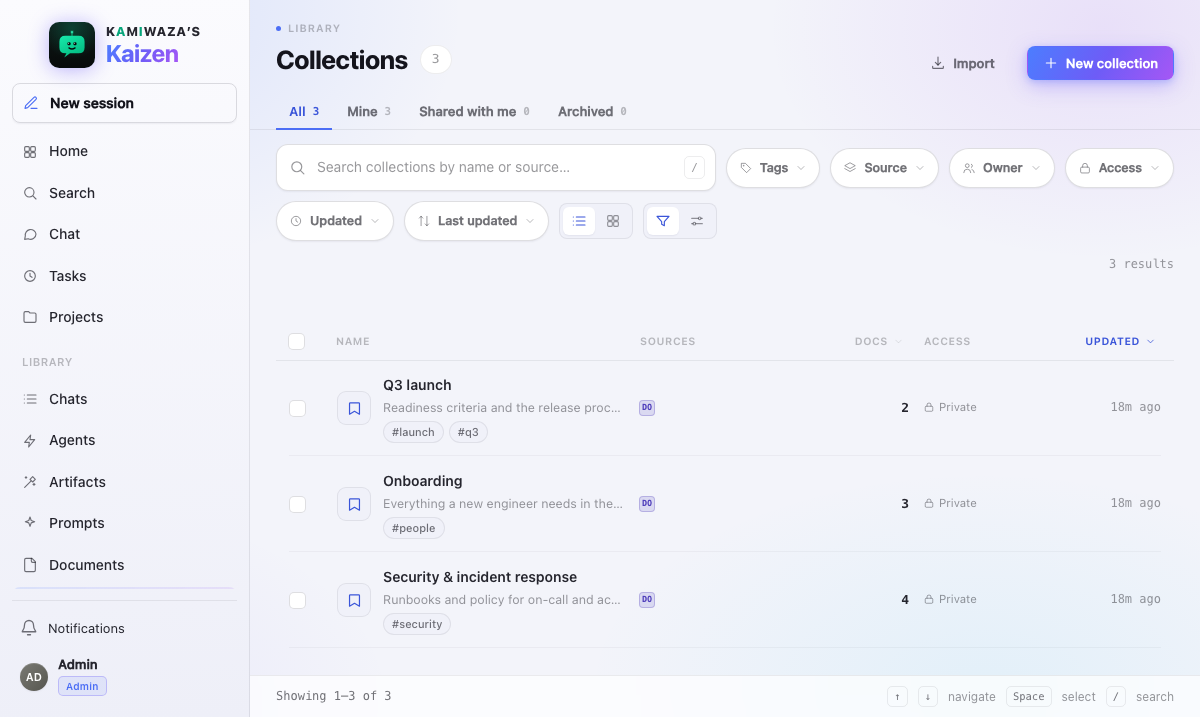
- Open Collections and choose New collection.
- Name it for the job it does — "Q3 launch", "security runbooks" — not for where the sources came from.
- Add sources from Search results, previews, or the collection screen itself.
The Collections library shares the same search, saved views, facets, and sorting as the other Library screens, and shows how many documents each collection holds.
Use a collection
- In Chat — scope the conversation so retrieval stays inside the set.
- In Search — narrow results to the curated sources.
- In an agent — give a custom agent a permanent knowledge scope, so anyone using it gets consistent grounding. See Building agents in Agent Studio.
Sharing and permissions
You own the collections you create, and ownership is what lets you change them.
A collection can be shared, but sharing never widens access. When someone opens a shared collection, its contents are re-checked against their own permissions, so they see only the items they are independently allowed to see. Two people can open the same collection and legitimately see different things.
Collections preserve each recipient's independent ACL. Shared chats are the deliberate exception: resources and results actually retained as part of a conversation become room content. See Sharing & collaborative chat.
Ask the assistant to file something
You can hand the filing to the assistant in chat: "add that document to Testing", "put the uploaded runbook in my Q3 launch collection". It looks up your collections, matches the name you used, files the item and tells you where it went. Filing the same item again refreshes the entry instead of adding a second copy.
What it will not do is as important as what it will:
- It files only into collections you own, and only items you can already open. Anything else it declines and your collection is left untouched.
- It cannot create, rename, delete or share a collection. Those stay with you on this screen. If you ask it to file something and you have no collection that fits, it is guided to say so and ask you to create one here or name an existing one, rather than reach for a workroom search index, which is not a collection in your Library.
- It cannot copy anything out of a connected system such as Microsoft 365 or GitHub. Bring that content in as a document first.
In chat, "collection" means a collection in your Library. The assistant treats it as a workroom search index only when you say so explicitly, for example by mentioning vectors, embeddings, RAG or Kamiwaza Context.
The same ask works for the rest of your Library: it can list your documents, artifacts, collections, prompts and projects to find what you meant, and it can link any of them into a project. See Projects.
A collection holds documents, so an artifact can be filed once it is one of your documents. Save it to Documents and then ask again, or ask the assistant to file the document it came from.
Link a collection to a Project
Open a collection's actions and choose Add to Project to organize it alongside related work. The link is a pointer — the collection stays in your Library, keeps its owner, and keeps its own permissions.
You can also drag a collection onto a Project you pinned in the left rail, or onto Projects to pick the destination. The drop does the same thing as the action, and a Project you only read refuses it.
A collection groups documents, so it is not a destination for a dragged artifact. To keep an artifact with related work, drag the artifact onto the Project instead — see Artifacts.
Good practice
- Keep collections small and purposeful. A collection with everything in it scopes nothing.
- Prefer a collection to a longer prompt. Constraining what can be retrieved is more reliable than asking the model to ignore things.
- Revisit them. A collection built around a launch stops being useful after the launch; prune or archive rather than letting it quietly go stale.