Building agents in Agent Studio
Agent Studio is a guided, step-by-step builder. You do not need an administrator, a proposal queue, or an approval to create an agent — creating one makes it live and private to you immediately.
Agent Studio is the visual, immediate builder described on this page. Agent Builder in Chat is a different, governed proposal workflow. It is useful when you want conversational refinement or need Package Creator to supply a reviewed package before the agent can be completed.
The steps
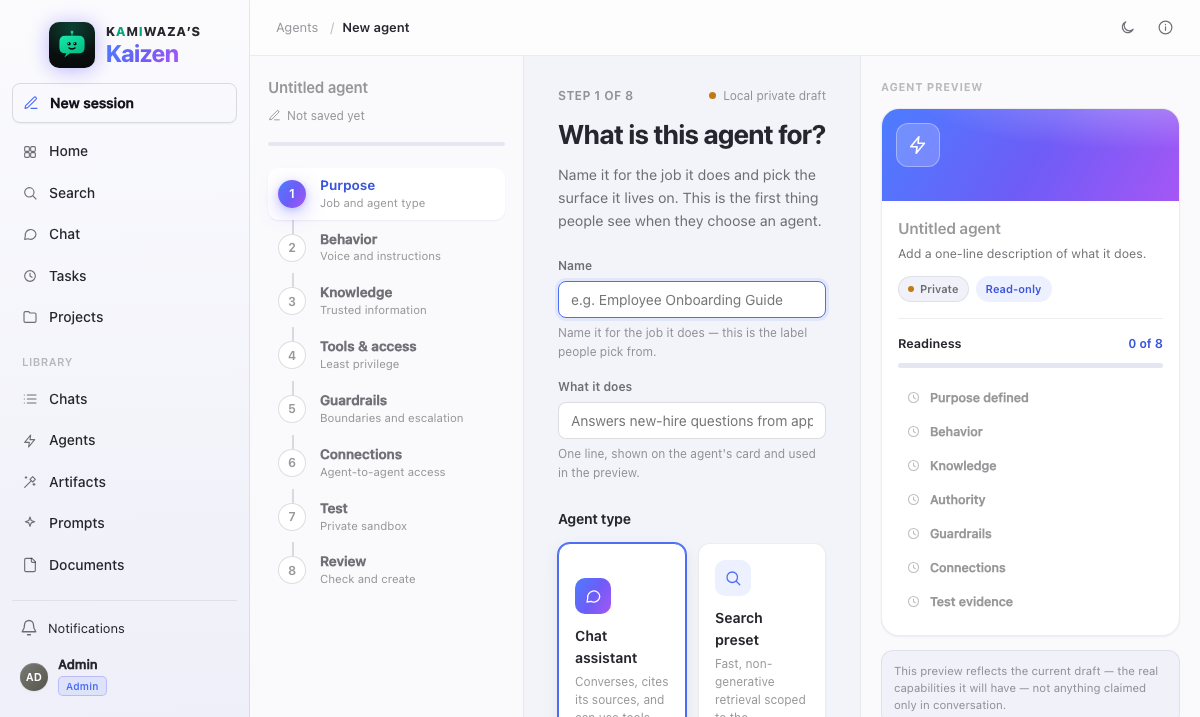
You move through a short series of steps that assemble the agent:
- Name and purpose — what it is for, in a sentence.
- Persona — how it should behave and respond.
- Tools — search, document reading, code execution, artifacts, tasks, and so on.
- Knowledge scope — for example, limit it to specific collections.
- Test — run it live and adjust.
- Finish — save it.
You can move back and forth between steps. New-agent changes stay a local draft until Save & finish creates one private version 1. Reopening an existing agent uses versioned autosave, so each real edit stays available in its history.
Test it live
Before you commit, the Test step runs your draft in a live, read-only sandbox. You have a real conversation with it, watch how it retrieves and answers, and go back to earlier steps until it behaves the way you want.
The test is genuinely the agent you are building — same runtime, same retrieval, same guardrails — not a preview approximation.
Finish and share
Creating the agent makes it live and private. When it is ready for others:
- Private — only you can use it.
- Direct share — name a member by email and grant use, duplicate, or edit access.
- All members — only an administrator can publish an agent deployment-wide.
Manage, edit, delete
You own the agents you create. Edit any of them in place — changes apply the next time the agent is used — or delete one when it is no longer useful. You can also fork an agent to branch from it without disturbing the original, and restore an earlier version if an edit made things worse.
Tips for good agents
Be specific in the persona. Clear instructions about scope, tone, and what to do when evidence is thin produce far more consistent answers than a vague personality sketch.
Scope the knowledge. Pointing an agent at the right collections makes it faster and more accurate than searching everything. Constraining what can be retrieved is more reliable than asking the model to ignore things.
Only grant the tools it needs. Fewer tools means more predictable
behavior, fewer failure modes, and a smaller blast radius. Grant run_code
when the agent genuinely needs to compute, not because it might one day.
Test with real questions — the ones you actually expect people to ask, including the awkward ones — before sharing.
Write for someone else. An agent you share is a small piece of infrastructure. Name it for the job, not the joke.
What Agent Studio will not let you do
- Grant an agent more authority than you have. An agent's reach is always bounded by the permissions of whoever runs it.
- Grant a Protected tool. Protected is the most sensitive tier, and those tools stay grayed out in the catalog with the reason on the row. Use them from Chat instead, where they run under your own approval policy.
- Grant more than 100 Kamiwaza tools, or more than 100 connectors, to one agent. Turning a whole surface on grants each of its operations separately, so a surface with dozens of operations spends dozens of those slots. If you reach the limit, the save is refused and the step tells you which list is too long — split the work across a few narrower agents rather than trying to fit everything into one.
- Publish to all members. That is deliberately an administrator action.
- Implement per-agent versions of shared behavior. Streaming, retries, budgets, compaction, audit, and policy come from the shared runtime, so every agent — including yours — inherits them identically.
Packages
Some capabilities come from packages — bundled tools that may include third-party code. Where your deployment enables them you can browse the package catalog and build packages as well as agents. Packaged code runs in a separate, secretless environment; see Isolation boundaries.
Build through Chat instead
Choose Agent Builder in Chat when you want to describe the specialist in conversation. Its first draft is saved immediately. You can later ask it to list your drafts, reopen one, review its current version, and change only the fields you name. A stale edit is refused and must be retried after reloading, so an older turn cannot overwrite newer work.
If you need Package Creator, Agent Builder records that exact package proposal as a dependency and leaves the agent draft unfinished. Package Creator can reload its own draft, revise manifest fields, preview bounded file changes, apply them, and test local code. Once the package is approved and active, return to Agent Builder and resume. The agent keeps its existing persona, tools, and knowledge scope, adds the approved package, and remains a draft for your final review and confirmed submission.
Package rejection or unavailability stays visible and blocks submission. The same check runs again during administrator approval. A built-in protected agent is maintained with Kaizen itself and cannot be replaced or edited through this proposal lane.