Models Overview
Kamiwaza provides a comprehensive system for managing the entire lifecycle of your AI models, from discovery and download to deployment and serving. This guide walks you through the key concepts and processes for working with models on the Kamiwaza platform.
Key Concepts
Kamiwaza is integrated directly with the Hugging Face Hub, allowing you to access a vast collection of open-source models. Models are identified by their Hugging Face repository ID, such as meta-llama/Llama-3.3-70B-Instruct.
Choosing the Right Model
Selecting the right model and configuration is crucial for achieving optimal performance and efficiency. The Kamiwaza platform automatically selects the best serving engine for your hardware and model type, but understanding the options will help you make informed decisions.
Model Formats and Engine Compatibility
Kamiwaza supports several model formats, each best suited for different serving engines and hardware configurations:
- GGUF: These models are highly optimized for CPU inference and are the standard for the
llama.cppengine. They are ideal for running on consumer hardware, including laptops with Apple Silicon, and support various quantization levels to reduce memory requirements. - Safetensors: This is a safe and fast format for storing and loading tensors. On macOS with Apple Silicon,
.safetensorsmodels are best served by theMLXengine to take full advantage of the GPU. On Linux with NVIDIA, AMD and other supported GPUs or accelerators (for example, Intel Gaudi 3), they are typically served withvLLM. - Other formats (PyTorch, etc.): General-purpose models are typically served using
vLLMon servers equipped with NVIDIA or AMD GPUs.
Model Serving Engines
Kamiwaza intelligently routes model deployment requests to the most appropriate serving engine. Here are the primary engines available in the platform:
vLLM Engine
- Purpose: Designed for high-throughput, low-latency LLM serving on powerful GPUs.
- Best For: Production environments with dedicated accelerators, such as NVIDIA, Intel Gaudi HPUs, or AMD GPUs.
- Key Features:
- PagedAttention: An advanced attention algorithm that dramatically reduces memory waste.
- Continuous Batching: Batches incoming requests on the fly for better GPU utilization.
- Tensor Parallelism: Distributes large models across multiple GPUs.
llama.cpp Engine
- Purpose: Optimized for efficient CPU-based inference and a popular choice for running models on consumer hardware.
- Best For:
- Running models on machines without a dedicated high-end GPU.
- Local development on both Intel-based and Apple Silicon Macs.
- Key Features:
- GGUF Format: Uses GGUF format which supports various levels of quantization for memory efficiency.
- Cross-Platform: Runs on Linux, macOS, and Windows.
- Metal Acceleration: On macOS, uses the Apple Silicon GPU for acceleration.
MLX Engine
- Purpose: Specifically built to take full advantage of Apple Silicon (M series) chips.
- Best For: High-performance inference on modern Mac computers.
- Key Features:
- Unified Memory: Leverages the unified memory architecture of Apple Silicon for efficient data handling.
- Native Process: Runs as a native macOS process, not in a container, for direct hardware access.
- Vision-Language Models: Supports multi-modal models.
Ampere llama.cpp Engine
- Purpose: A specialized variant of
llama.cppoptimized for Ampere arm-based CPU architectures. - Best For: Running GGUF models on Ampere CPUs, such as the AmpereOne M servers.
External Endpoints
In addition to running models locally, Kamiwaza can register external inference endpoints — either cloud-hosted services or customer-operated proxies — and expose them through the same deployment, audit, and access-control surfaces as local models.
Supported integrations:
- AWS Bedrock — Anthropic Claude, Meta Llama, Amazon Nova, and other Bedrock-hosted families.
- AWS Transcribe — managed batch and streaming speech-to-text.
- OpenAI-compatible chat — OpenAI directly, Azure OpenAI Service, Azure AI Foundry, customer-hosted LiteLLM proxies, and any other provider whose chat API matches the OpenAI shape.
- OpenAI-compatible transcription — OpenAI Whisper, Azure Whisper / gpt-4o-transcribe, and any other provider whose transcription API matches the OpenAI shape.
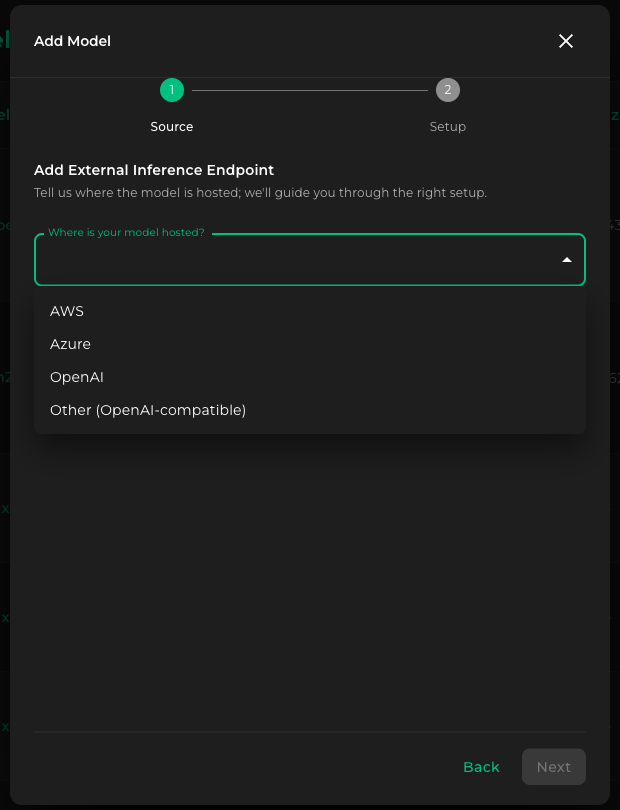
Registration is an admin action: an operator pastes provider credentials into the registration form, and once deployed, the endpoint is invoked the same way as any local deployment. The Source step of the wizard offers four hosting options — AWS, Azure, OpenAI, and Other (OpenAI-compatible) — and routes to a provider-specific Setup form from there. See each provider page for the exact wizard fields.
Credentials catalog
Credentials registered through any of the four flows above are encrypted on save and stored in the Kamiwaza secret catalog under a deterministic key derived from the provider and target — AWS region for Bedrock and Transcribe, base URL for OpenAI-compatible chat and transcription.
When you register a second endpoint that targets the same key — a second Bedrock model in the same region, or a second OpenAI-compatible model on the same base URL — Kamiwaza recognizes the existing credential and offers:
- Use existing credential — keep the stored value. No new entry is created.
- Use a different credential — overwrite. The replacement propagates to every endpoint sharing that credential within the engine credential cache window (roughly five minutes), without restarting any deployment.
You can rotate the credential later from any model's Edit form; rotation propagates the same way. When a model is deleted, Kamiwaza cleans up secrets that no other model still references.
Use long-lived credentials. Temporary or session credentials expire while a deployment is running and lead to silent authentication failures partway through use.