OpenAI-Compatible Chat Endpoint Integration
Overview
Kamiwaza can register any external endpoint that speaks the OpenAI /v1/chat/completions wire format and proxy it through the same deployment, audit, and access-control surfaces as locally hosted models. This includes OpenAI directly, Microsoft Azure's OpenAI Service and AI Foundry, customer-hosted LiteLLM proxies, self-hosted vLLM or Ollama, and any other provider whose chat API matches the OpenAI shape.
Once registered, the endpoint deploys through the normal model lifecycle and exposes a Kamiwaza /v1/chat/completions route that applications can call without knowing which provider sits behind it.
Prerequisites
Before registering an OpenAI-compatible endpoint, make sure:
- You have a provider API key (OpenAI key, Azure resource key, Azure AI Foundry project key, LiteLLM master key, etc.).
- The model you intend to register is enabled on the account the API key belongs to. For Azure, the deployment exists in the project the URL points at.
- Outbound HTTPS from the Kamiwaza control plane to the provider hostname is permitted (see Provider examples below for hostnames).
Quick Start (UI)
Registration is a three-step wizard: pick the provider, configure the endpoint, then pick which discovered models to register.
-
In Kamiwaza, go to Models, click Add Model, then click Add external inference endpoint in the dialog header.
-
Source — under Where is your model hosted?, choose one of:
- OpenAI — for OpenAI directly.
- Azure — for Azure OpenAI Service or Azure AI Foundry. Kamiwaza detects which one from the hostname you paste in step 3.
- Other (OpenAI-compatible) — for LiteLLM proxies, vLLM, Ollama, or any other host whose chat API matches the OpenAI shape.
Click Next.
-
Setup — configure the endpoint:
- Inference endpoint URL — The provider's API root.
- For OpenAI: leave the default
https://api.openai.com/v1. Organization and project scoping are handled by the API key itself (sk-proj-…keys) plus optionalOpenAI-Organization/OpenAI-Projectheaders — there is no separate base URL for them. - For Azure: paste the URL Azure gave you (
https://<your-resource>.openai.azure.comorhttps://<your-project>.services.ai.azure.com/models). Kamiwaza picks the right Azure handler from the hostname. - For Other: paste your published proxy or service URL.
- For OpenAI: leave the default
- Credentials — If a credential is already stored for this endpoint, Kamiwaza offers Use existing credential with a Use a different credential link to override. Otherwise paste the provider API key. See Credentials below for what to use.
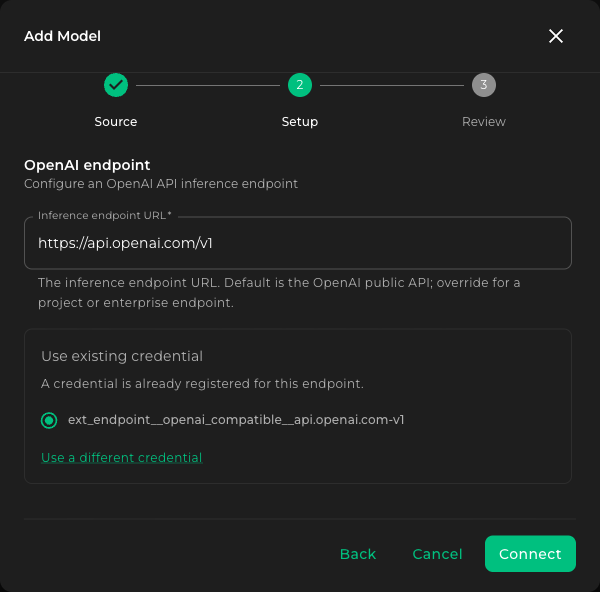
Click Connect. Kamiwaza validates the URL, authenticates with the credential, and discovers the models the endpoint exposes.
- Inference endpoint URL — The provider's API root.
-
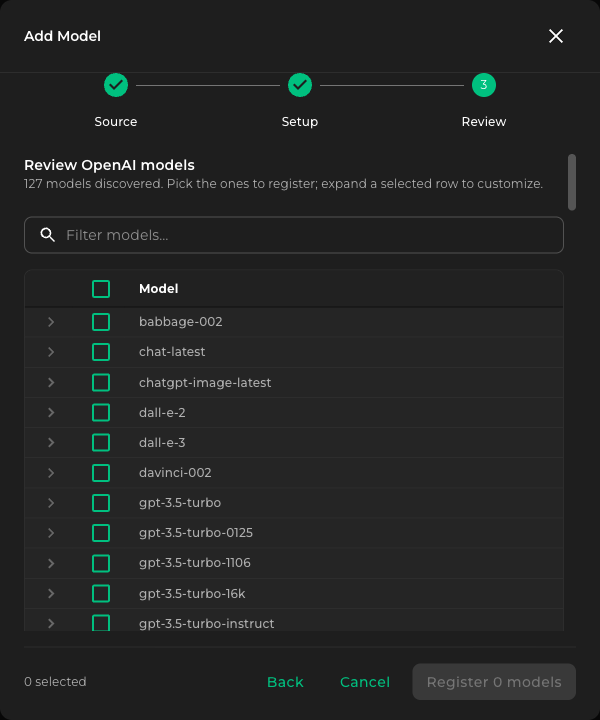
Review — Kamiwaza shows the list of models discovered on the endpoint. Tick the checkbox for each model you want to register. Expand a row to customize the display name, default parameters, or other per-model settings. Use the Filter models… box to narrow the list. Click Register N models when done.
-
From the Models list, deploy each newly registered model.
Test each deployment from the Models list to confirm Kamiwaza can reach the provider with the credentials you supplied before applications start calling it.
Provider examples
The wizard is the same for every provider; only the values change.
OpenAI directly
| Field | Value |
|---|---|
| Source | OpenAI |
| Inference endpoint URL | https://api.openai.com/v1 |
| Credential | OpenAI API key (sk-…) |
| Underlying model (Review step) | gpt-5, gpt-4o, gpt-5-chat-latest, etc. |
Restricted OpenAI keys default to chat-only. If you also intend to register a transcription endpoint with the same key, widen the key's scope to include
Audiofirst.
Azure OpenAI Service
| Field | Value |
|---|---|
| Source | Azure |
| Inference endpoint URL | https://<your-resource>.openai.azure.com |
| Credential | Azure OpenAI resource key |
| Underlying model (Review step) | The Azure deployment name (e.g. gpt-4o) |
Kamiwaza auto-detects the *.openai.azure.com host and uses Azure's api-key header with a stable api-version. You do not need to specify either in the form.
Azure AI Foundry
| Field | Value |
|---|---|
| Source | Azure |
| Inference endpoint URL | https://<your-project>.services.ai.azure.com/models |
| Credential | Azure AI Foundry project key |
| Underlying model (Review step) | The Foundry deployment name (e.g. Mistral-Large-3) |
Kamiwaza detects Foundry hostnames separately from Azure OpenAI Service. Azure Government Foundry endpoints (different hostname suffix) are supported through the same handler.
Customer-hosted LiteLLM proxy
| Field | Value |
|---|---|
| Source | Other (OpenAI-compatible) |
| Inference endpoint URL | Your published proxy URL (e.g. https://litellm.example.com) |
| Credential | The proxy's master key (or a virtual key) |
| Underlying model (Review step) | The model alias as configured in your LiteLLM config |
LiteLLM's upstream provider credentials are managed by you on the proxy itself; Kamiwaza only authenticates to the proxy.
Self-hosted vLLM, Ollama, or other OpenAI-compatible service
Use Other (OpenAI-compatible), paste your internal hostname, and supply whatever bearer token the service requires (or any non-empty placeholder if it is open).
Credentials
Credentials registered through the OpenAI-compatible form are encrypted on save and stored in the Kamiwaza secret catalog, keyed by base URL. Reuse-vs-replace behavior on registration, rotation through the Edit form, and the five-minute propagation window are described in External endpoints overview.
For most providers the credential is a single API key string. Kamiwaza handles wrapping it in the right header (Authorization: Bearer …, Azure's api-key, etc.) based on the detected provider.
API Usage
Once deployed, the endpoint is callable via the standard Kamiwaza runtime route:
curl -X POST "https://<your-domain>/runtime/models/<deployment-id>/v1/chat/completions" \
  -H "Authorization: Bearer $TOKEN" \
  -H "Content-Type: application/json" \
  -d '{
    "messages": [{"role": "user", "content": "Hello"}],
    "max_tokens": 50
  }'
Streaming, tool calls, and structured-output requests follow the same shape applications use against any OpenAI-compatible endpoint. Whether the underlying provider supports each capability depends on the specific model.
For reasoning models (OpenAI o-series, gpt-5.x) called through /v1/chat/completions, Kamiwaza translates max_tokens to max_completion_tokens automatically. For OpenAI itself, reasoning controls (reasoning_effort and the broader reasoning configuration) belong on OpenAI's Responses API path (/v1/responses), where they are forwarded as the reasoning object, not on chat completions, where a reasoning_effort value is dropped at the param-allowlist boundary.
For a self-hosted server such as vLLM, Ollama, or a LiteLLM proxy, Kamiwaza drops reasoning_effort on chat completions unless the model configuration's external_endpoint sets supports_reasoning_effort: true. With it set, Kamiwaza forwards the requested effort, including none, to the server. A value the server rejects returns the server's 400 error. The registration form does not show this setting yet. To set it, read the configuration with GET /api/model_configs/{model_config_id}, add "supports_reasoning_effort": true inside its existing external_endpoint value, keeping that value's other fields and its format, and send the whole configuration back with PUT /api/model_configs/{model_config_id}, which replaces it.
Operational notes
- Inference errors from the upstream provider are surfaced through the Kamiwaza response body. Every inference call records requester, workroom, and deployment ID in the Kamiwaza audit log under
event_type=model_invocation, regardless of upstream success or failure. Use whichever log-aggregation mechanism your deployment provides to surface those entries. - Multiple registered models that share a base URL share one credential in the catalog. Rotating that credential through any model's Edit form updates all of them.
- For environments that require private connectivity (VPC endpoints, private link, mesh-internal proxies), point the Inference endpoint URL at the private hostname; Kamiwaza does not enforce reachability.
Next steps
- Register a transcription endpoint against the same provider — see OpenAI-Compatible Transcribe.
- Pair the deployment with the ReBAC validation checklist to ensure workroom-scoped access controls are enforced.
- Contact Kamiwaza Support for help with non-standard providers, sovereign-cloud hostnames, or private connectivity.