AWS Bedrock Model Integration
Overview
Kamiwaza can proxy Amazon Bedrock models through the same OpenAI-compatible APIs used by locally hosted models. Administrators register Bedrock as an external endpoint, deploy it through the normal model lifecycle, and expose familiar /v1/models and /v1/chat/completions routes to application teams.
The Bedrock integration covers the major model families available in Bedrock — including Anthropic Claude (Sonnet, Haiku, Opus), Amazon Nova, Meta Llama 3, and other Bedrock-hosted families — invoked through the modern Bedrock Converse and InvokeModel APIs.
Prerequisites
Before registering a Bedrock endpoint, make sure:
- Your AWS account has Bedrock access enabled in the region you plan to use.
- The target model or inference profile is enabled in that account and region.
- Outbound HTTPS from the Kamiwaza control plane to
bedrock-runtime.<region>.amazonaws.comis permitted. For VPC endpoints or private connectivity, point the deployment at the private hostname. - You have either an AWS IAM access key or a Bedrock API key (bearer token) that can invoke the target model.
Quick Start (UI)
-
In Kamiwaza, go to Models, click Add Model, then click Add external inference endpoint in the dialog header.
-
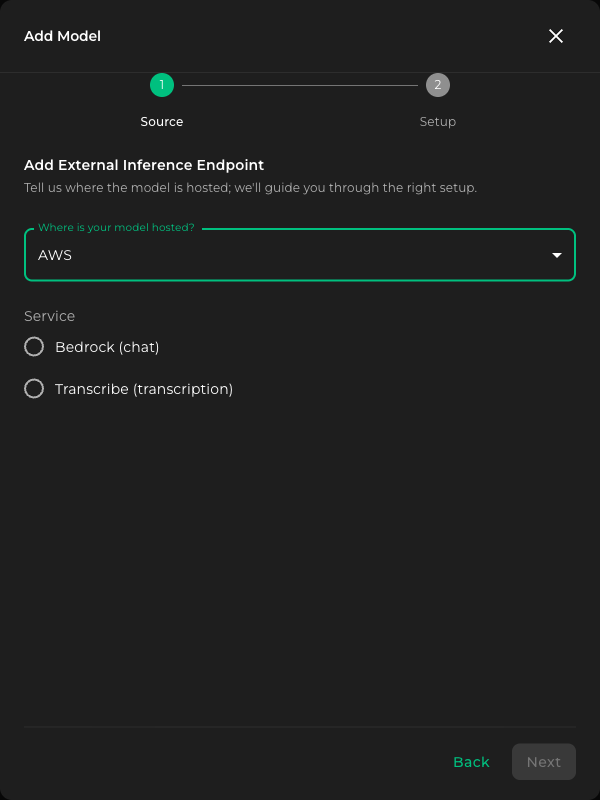
On the Source step, choose AWS under Where is your model hosted?, then choose Bedrock (chat) under Service. Click Next.
-
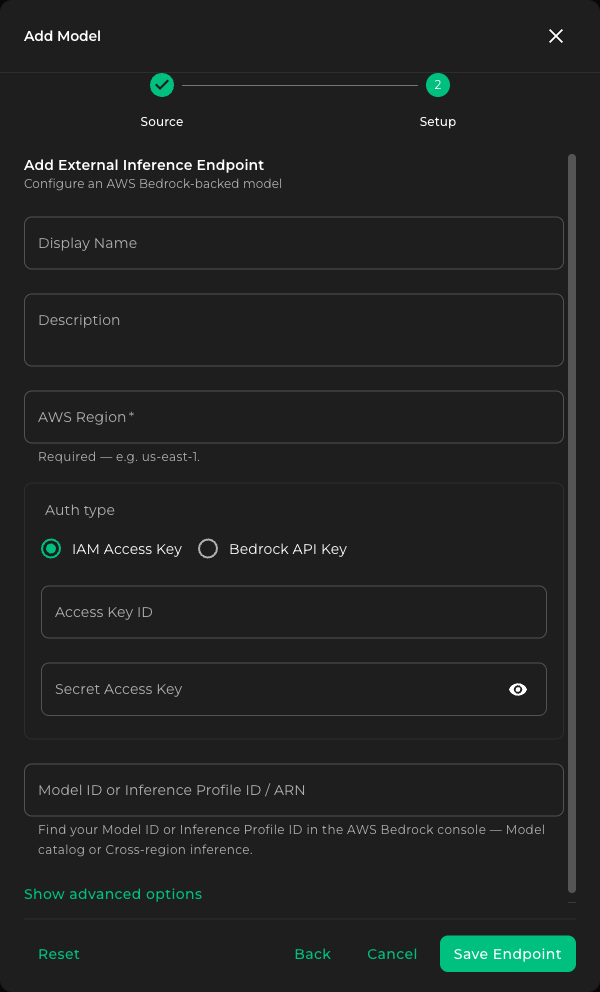
On the Setup step, fill in the form:
- Display Name — Friendly name shown in the Kamiwaza UI.
- Description (optional) — Free-form note for other operators.
- AWS Region — The region where the Bedrock model or inference profile is available (for example
us-east-1,us-west-2,eu-west-1). Required. - Auth type — Choose IAM Access Key (the default; long-lived AWS access key + secret) or Bedrock API Key (bearer token). Most production setups use IAM access keys.
- For IAM Access Key, paste the Access Key ID and Secret Access Key.
- For Bedrock API Key, paste the bearer token.
- Model ID or Inference Profile ID / ARN — Either a Bedrock model ID, an inference profile ID, or a full ARN. See Model identifiers below for examples.
-
(Optional) Click Show advanced options to reveal an Endpoint URL field. Leave it blank to use the AWS default for your region. Set it explicitly for VPC PrivateLink, GovCloud, or other non-standard endpoints (placeholder shown is
https://bedrock-runtime.us-east-2.amazonaws.com).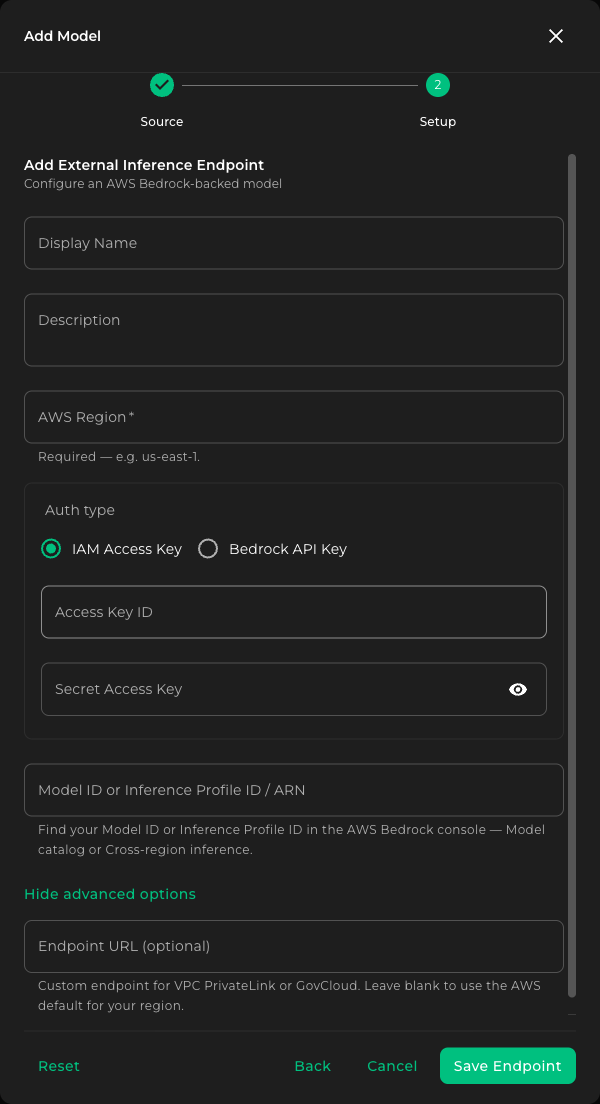
-
Click Save Endpoint.
-
Deploy the new model from the Models list.
Use long-lived IAM credentials for production. Temporary or session credentials expire while a deployment is running and lead to silent authentication failures. Kamiwaza no longer accepts a session token field on registration.
Model identifiers
The Model ID or Inference Profile ID / ARN field accepts three shapes — pick whichever matches what AWS gave you for the model you want to call.
| Shape | Example | When to use |
|---|---|---|
| Foundation model ID | anthropic.claude-sonnet-4-5-20250929-v1:0 | Calling a foundation model directly in a single region. |
| Inference profile ID | us.anthropic.claude-sonnet-4-5-20250929-v1:0 | Cross-region inference profiles that AWS published for you. |
| Inference profile ARN | arn:aws:bedrock:us-east-1:123456789012:inference-profile/us.anthropic.claude-sonnet-4-5-20250929-v1:0 | Application or custom inference profiles, or any case where you'd rather paste the full ARN. |
Use the same field for all three — Kamiwaza recognizes the shape and routes the call accordingly.
Credentials
Credentials registered through the Bedrock form are encrypted on save and stored in the Kamiwaza secret catalog, keyed by AWS region. The catalog rules — credential reuse across endpoints in the same region, rotation through the Edit form, and the five-minute propagation window — are described in External endpoints overview.
For IAM Access Key authentication, the stored secret is JSON containing your long-lived AWS keys:
{
  "aws_access_key_id": "AKIA...",
  "aws_secret_access_key": "..."
}
For Bedrock API Key authentication, the stored secret is the raw bearer token Bedrock issued. Kamiwaza handles the wrapping when you paste it into the form.
API Usage
Once deployed, the endpoint is callable via the standard Kamiwaza runtime route:
curl -X POST "https://<your-domain>/runtime/models/<deployment-id>/v1/chat/completions" \
  -H "Authorization: Bearer $TOKEN" \
  -H "Content-Type: application/json" \
  -d '{
    "messages": [
      {"role": "user", "content": "Summarize the Bedrock Converse API in one sentence."}
    ],
    "max_tokens": 128,
    "temperature": 0
  }'
OpenAI-style streaming, tool calls, and structured output are supported on Bedrock model families that support them upstream. Kamiwaza translates between OpenAI wire format and the Bedrock Converse API on each request.
Multimodal input
Claude and Nova deployments accept OpenAI-style multimodal payloads on /v1/chat/completions. Image inputs use OpenAI-style content blocks; Kamiwaza converts them to the appropriate Bedrock-native shape.
For Nova, image inputs work with inline data: URLs — arbitrary external image URLs are not fetched server-side.
{
  "messages": [
    {
      "role": "user",
      "content": [
        {
          "type": "image_url",
          "image_url": {
            "url": "data:image/png;base64,<base64-image-bytes>"
          }
        },
        {"type": "text", "text": "What is shown in this image?"}
      ]
    }
  ],
  "max_tokens": 128,
  "temperature": 0
}
Operational notes
- Region is required. Bedrock model availability and pricing vary by region; the registration form will not save without one. If you paste a full inference profile ARN, the region in the ARN must match the AWS Region field.
- Model availability is account- and region-specific. A model ID that works in one AWS account or region may not be enabled in another. Verify in the AWS console before registering.
- Errors from Bedrock — throttling, access denied, model not enabled — are surfaced through the Kamiwaza response body and the audit log.
- For VPC PrivateLink, GovCloud, or other non-standard endpoints, set the Endpoint URL field under Show advanced options on the registration form. Ensure the Kamiwaza control-plane network has a permitted path to the chosen hostname before registering.
- Rotate long-lived IAM credentials regularly. Treat the registered access key like any other long-lived AWS credential — rotate on the same cadence as the rest of your cloud key inventory and monitor
AccessKeyLastUsedin IAM. Rotated credentials propagate to running deployments through the Edit form within the engine credential cache window (~5 minutes).
Next steps
- Pair the Bedrock deployment with the ReBAC validation checklist to ensure workroom-scoped access controls are enforced.
- Register a transcription endpoint against the same AWS account — see AWS Transcribe.
- Contact Kamiwaza Support if you need help with model enablement, custom inference profiles, or private network connectivity.